For UK weddings
Collect wedding RSVPs online
Guests reply from your wedding website link in under a minute, with a meal choice for each course. Every reply shows you who chose what; on Plus you get a guest list, per-course totals and a caterer-ready PDF. There's no app and guests don't need accounts.
What's included
Free online wedding RSVPs
Add the RSVP section and anyone with your link can reply. Each reply lists everyone in the party, coming or not, with plus-ones if you allow them. The free plan holds 30 replies.
Meal choices with the RSVP
Set up to five named menus, each with up to ten courses and thirty options a course. Every attendee picks one option per course, and each reply shows you exactly who chose what.
Open or guest-list RSVP
Open, on every plan: anyone with the link types their name and replies. Guest list, on Plus and above: you type the names in as individuals, couples or groups, and guests find themselves to reply.
A PDF for your caterer
On Plus and above, per-course totals and a printable catering sheet, with the guests who flagged a dietary follow-up. Email it straight to your venue.
See who hasn't replied
With a guest list (Plus and above) the studio shows an Awaiting filter of everyone still to answer. Open RSVP has no invited list, so you compare replies against your own.
No dietary details stored
Guests tap 'Dietary needs' on a course and nothing more. You follow up directly to discuss specifics, which keeps sensitive religious or medical details off our database entirely.
How RSVPs work on Ode
01
Set up your RSVP
Choose open or guest-list RSVP. Add menus with courses and options, decide on plus-ones and set a reply deadline.
02
Share your wedding link
Send the link via message, email or a QR code on a save-the-date. Guests reply in under a minute.
03
Read the replies
Every reply lands in the studio with each person's choices. Filter by dietary needs. On Plus, see who is still to answer, per-course totals and the caterer PDF.
The RSVP dashboard
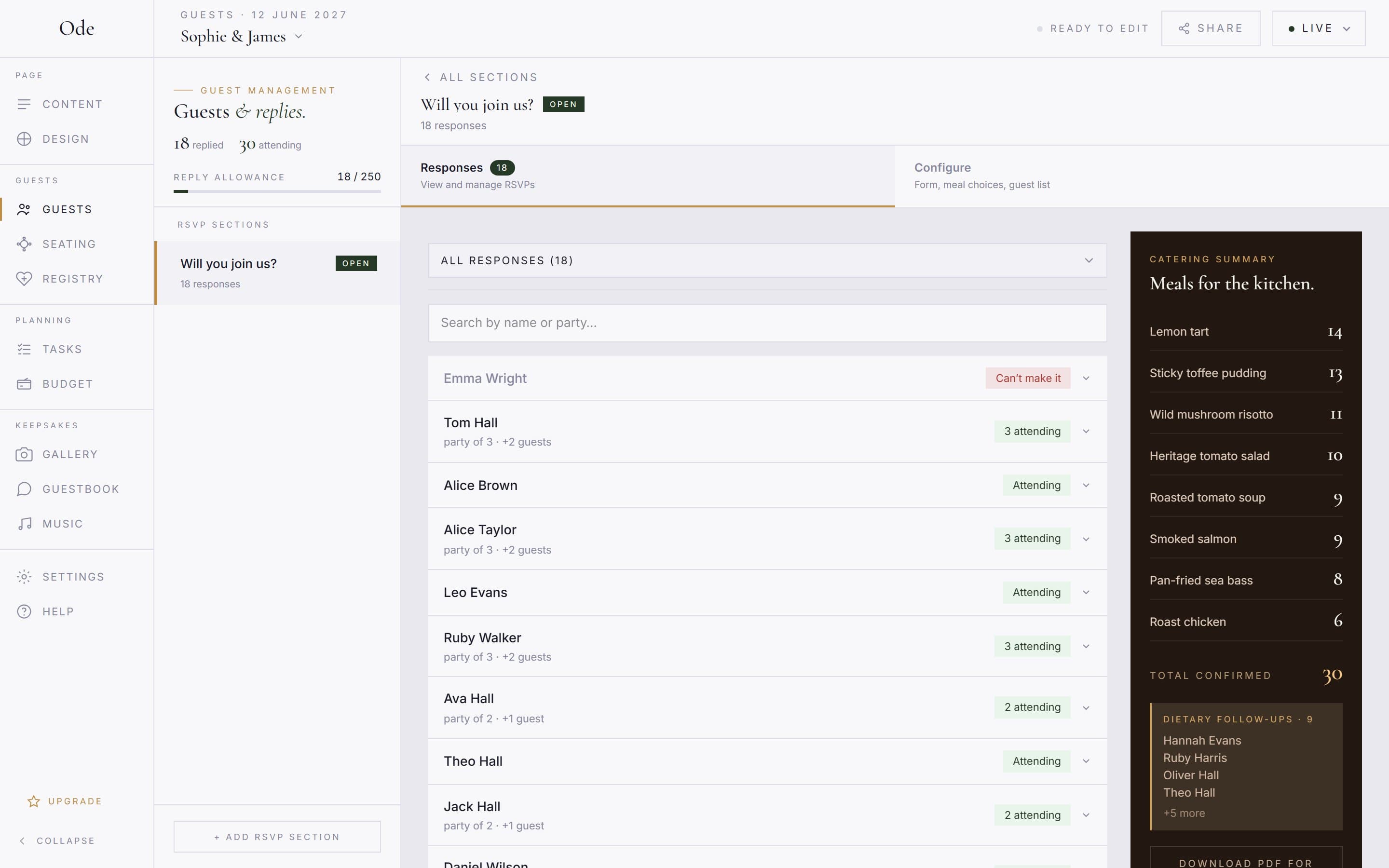
Every reply lands in the studio with each person’s meal choices and a flag for anyone who needs a dietary follow-up. Filter by attending, declined or dietary needs, and search by name. On Plus and above, per-course totals update as replies arrive and one click gives you a printable PDF for the kitchen.
What’s free and what’s on Plus
Free plan
- Open RSVP: anyone with the link replies
- Meal choices: up to 5 menus, 10 courses, 30 options a course
- Plus-ones, one or two per guest
- Reply deadline in your timezone
- Every reply with each person's choices
- Dietary needs filter
- 30 replies (75 on Starter)
Plus and Complete add
- Guest-list RSVP: only the names you enter can reply
- Awaiting filter of who hasn't answered
- Per-course totals
- Catering PDF with dietary follow-ups
- 250 replies (500 on Complete)
- Replies feed the seating planner
Replies are kept for 90 days after the wedding date, then deleted. Plus is £35 and Complete £65, each a one-off payment. See pricing.
What guests are asked
A good UK wedding RSVP asks the minimum it needs to and nothing more. Ode asks exactly this, in this order, and there are no custom questions to add.
Their name.
Typed in on an open RSVP, or found from your list on a guest-list RSVP.
Who's coming?
Everyone in the party, each marked Coming or Can't make it. If you allow plus-ones, '+ Add a guest' appears here.
A meal card per attendee.
One option per course from the menu they choose, or 'No thanks' for a course they'll skip, or 'Dietary needs' to flag a follow-up.
A note to the couple.
Optional and free text. This is the only open question.
Send RSVP.
Or 'Send our apologies' if nobody in the party can come.
What we don’t ask: religion, health conditions, allergy details, or anything sensitive. Under UK GDPR that’s special category data you shouldn’t be collecting through a form. Guests flag that they have a dietary need, and you follow up with them directly, so the details stay off the platform entirely.
For the words on the invitation itself, see our guides to wedding RSVP wording and choosing an RSVP deadline.
More of what Ode does
Wedding website builder
Build your wedding website in an evening.
ExploreWedding seating plan
Drag or tap guests onto tables.
ExploreWedding photo sharing
A QR code photo album for your guests.
ExploreWedding guestbook
Messages and well-wishes from your phone.
ExploreFree wedding website
The full builder, free.
ExploreWedding RSVP questions
Set up your page this evening
Free to start · No card required